> ## Documentation Index
> Fetch the complete documentation index at: https://docs.int3face.zone/llms.txt
> Use this file to discover all available pages before exploring further.
# TON demo
* Demos
* TON demo
On this page
## Requirements[](#requirements "Direct link to Requirements")
1. Access to Int3face node on int3-test-2
2. TON testnet wallet
3. TON-bridge repository
Current bridge address on TON is `EQCgQY3KSzPEh-uAuERDX2rh5pea2B5TedRdoExsIU7m_IZ4`
## TON testnet wallet[](#ton-testnet-wallet "Direct link to TON testnet wallet")
1. Create a wallet on TON testnet - [https://wallet.ton.org/?testnet=true](https://wallet.ton.org/?testnet=true)
2. Request some tokens from the faucet - [https://t.me/testgiver\_ton\_bot](https://t.me/testgiver_ton_bot)
3. Save your wallet mnemonic
## TON-bridge repository[](#ton-bridge-repository "Direct link to TON-bridge repository")
This repository contains cli tool that allows to communicate with the bridge contract
1. Install Node.js v18
2. `ts-node` (install with `npm install ts-node`)
3. Essential ton packages (install with `npm install @ton/ton @ton/crypto @ton/core`)
4. Clone the repository `git clone https://github.com/Int3facechain/ton-bridge.git`
## Inbound Transfer[](#inbound-transfer "Direct link to Inbound Transfer")
**You should have at least 1.2 TON in your wallet**
1. Create new wallet in Int3face or use existing wallet
```shell theme={null}
# Create new wallet
int3faced keys add "$your_key_name"
# List existing wallets
int3faced keys list
```
We will use address `int3104s3nrdvh2d33p53gyzy5sczcep2dkmagpvhrk`
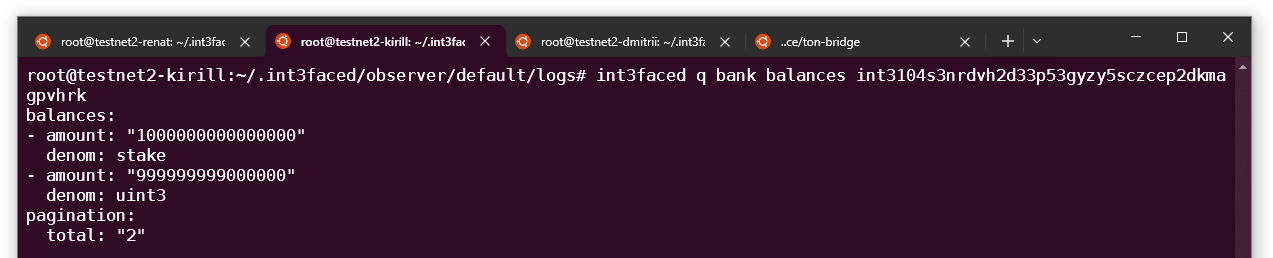
2. Lets check current balance of our wallet
```
int3faced q bank balances int3104s3nrdvh2d33p53gyzy5sczcep2dkmagpvhrk
```
 3. Go to the `ton-bridge` folder
4. Set env variables with the TON wallet mnemonic and version
```shell theme={null}
export WALLET_MNEMONIC="spare throw guide income fade burst regular ranch fence basket frown security upset faith stay time recipe random exhaust admit leader undo soup muscle"
export WALLET_VERSION=v3r2
```
5. Send deposit transaction to the TON bridge contract
```
npx blueprint run
```
* Select `depositInt3faceBridge`
* Select `testnet`
* Select `Mnemonic`
* Enter bridge address `EQCgQY3KSzPEh-uAuERDX2rh5pea2B5TedRdoExsIU7m_IZ4`
* Enter Int3face destination address `int3104s3nrdvh2d33p53gyzy5sczcep2dkmagpvhrk`
* Wait for deposit completion
3. Go to the `ton-bridge` folder
4. Set env variables with the TON wallet mnemonic and version
```shell theme={null}
export WALLET_MNEMONIC="spare throw guide income fade burst regular ranch fence basket frown security upset faith stay time recipe random exhaust admit leader undo soup muscle"
export WALLET_VERSION=v3r2
```
5. Send deposit transaction to the TON bridge contract
```
npx blueprint run
```
* Select `depositInt3faceBridge`
* Select `testnet`
* Select `Mnemonic`
* Enter bridge address `EQCgQY3KSzPEh-uAuERDX2rh5pea2B5TedRdoExsIU7m_IZ4`
* Enter Int3face destination address `int3104s3nrdvh2d33p53gyzy5sczcep2dkmagpvhrk`
* Wait for deposit completion
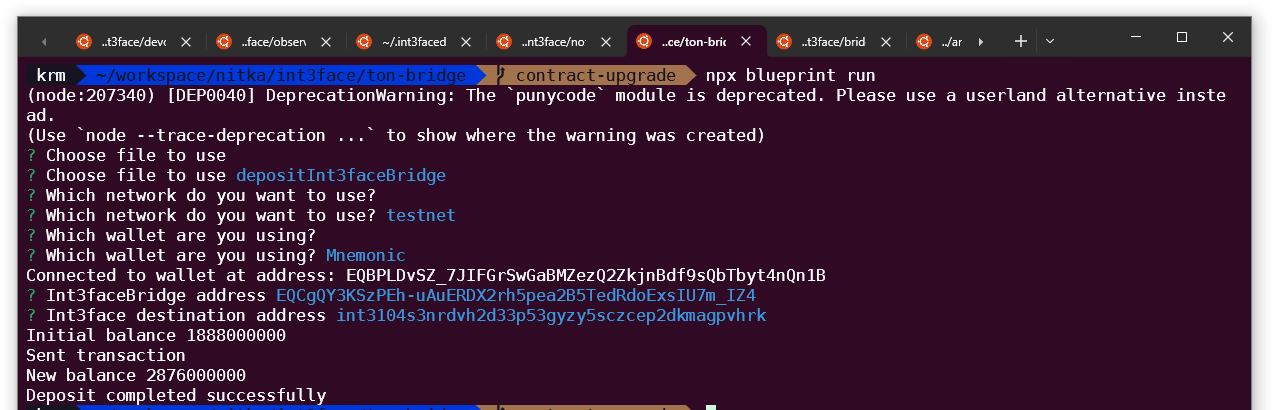 Now the transaction should be observed by the Observer and sent to the Int3face chain.
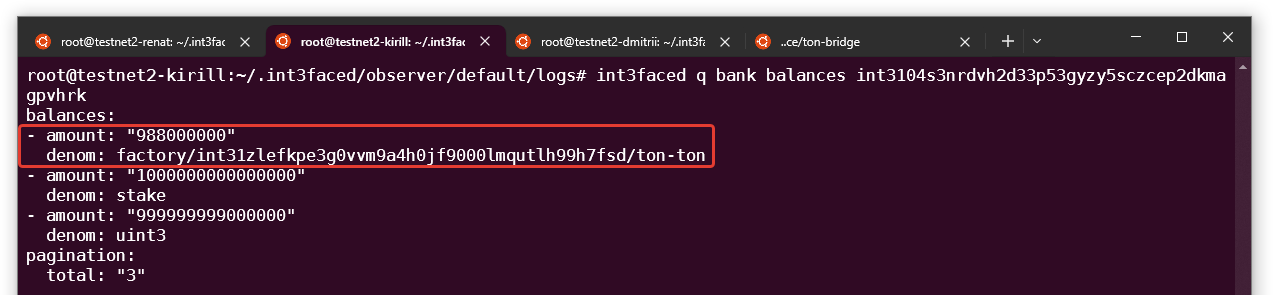
6. Check your balance on the Int3face
We should see that TON tokens were minted to our wallet.
```
int3faced q bank balances int3104s3nrdvh2d33p53gyzy5sczcep2dkmagpvhrk
```
Now the transaction should be observed by the Observer and sent to the Int3face chain.
6. Check your balance on the Int3face
We should see that TON tokens were minted to our wallet.
```
int3faced q bank balances int3104s3nrdvh2d33p53gyzy5sczcep2dkmagpvhrk
```
 ## Outbound Transfer[](#outbound-transfer "Direct link to Outbound Transfer")
Lets send some TON tokens back to the TON chain.
We will use `EQBnAShkO0i9XeRgGwf84NhGbb3_onAZXnUYo5MzaBh07_z8` address as a recipient
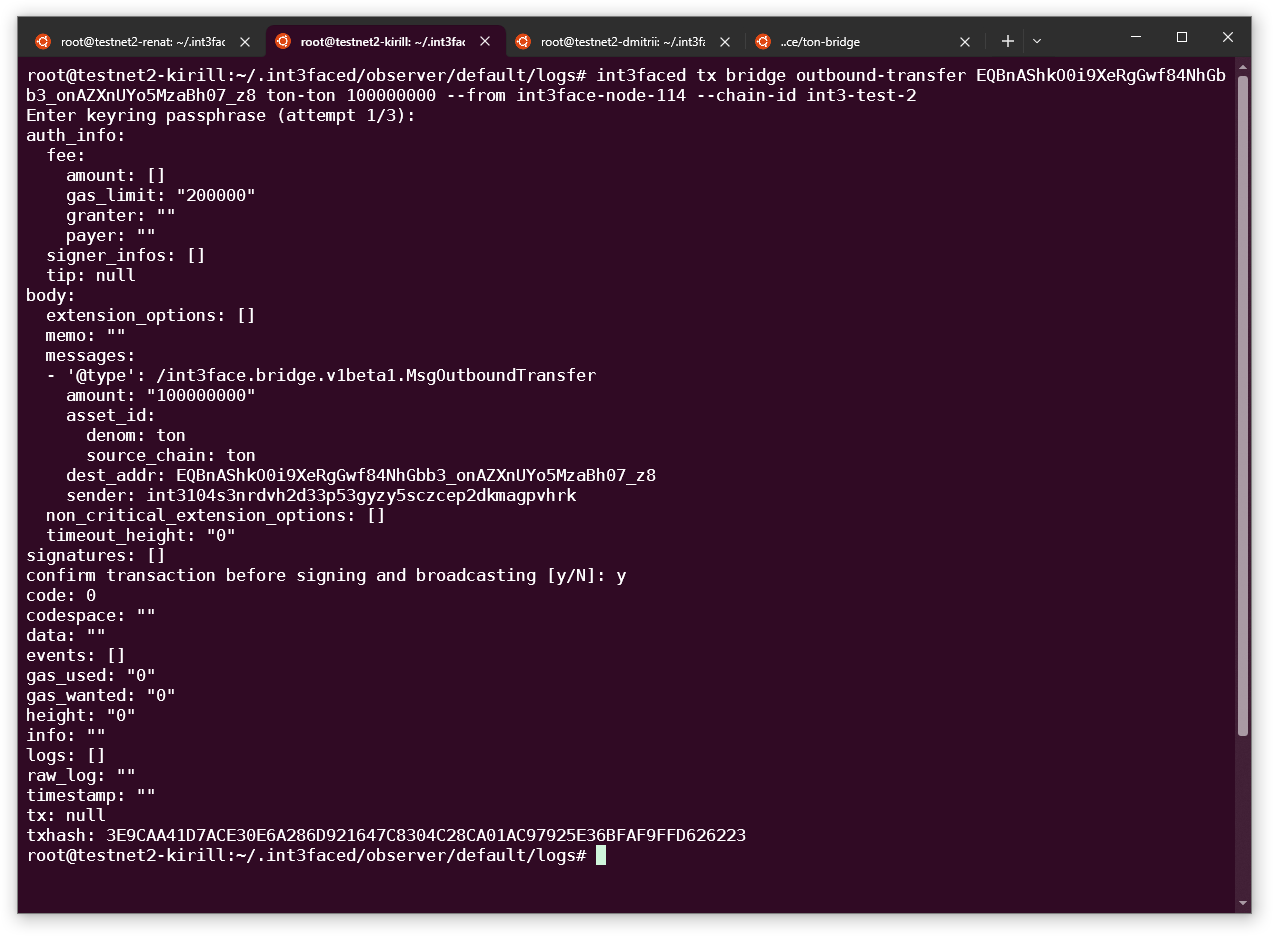
1. Execute outbound transfer request for the x/bridge
```shell theme={null}
int3faced tx bridge outbound-transfer EQBnAShkO0i9XeRgGwf84NhGbb3_onAZXnUYo5MzaBh07_z8 ton-ton 100000000 --from int3face-node-114 --chain-id int3-test-2
...
txhash: 3E9CAA41D7ACE30E6A286D921647C8304C28CA01AC97925E36BFAF9FFD626223
...
```
## Outbound Transfer[](#outbound-transfer "Direct link to Outbound Transfer")
Lets send some TON tokens back to the TON chain.
We will use `EQBnAShkO0i9XeRgGwf84NhGbb3_onAZXnUYo5MzaBh07_z8` address as a recipient
1. Execute outbound transfer request for the x/bridge
```shell theme={null}
int3faced tx bridge outbound-transfer EQBnAShkO0i9XeRgGwf84NhGbb3_onAZXnUYo5MzaBh07_z8 ton-ton 100000000 --from int3face-node-114 --chain-id int3-test-2
...
txhash: 3E9CAA41D7ACE30E6A286D921647C8304C28CA01AC97925E36BFAF9FFD626223
...
```
 3. Lets check that our tx is successful in the Int3face
```
int3faced q tx EBA98D0CDF77700BDC0096E03CB013A2FA5D72945E3B2239CCF0ED69A50EE16C
```
3. Lets check that our tx is successful in the Int3face
```
int3faced q tx EBA98D0CDF77700BDC0096E03CB013A2FA5D72945E3B2239CCF0ED69A50EE16C
```
 4. We can verify the transfer in the [TON explorer](https://testnet.tonviewer.com/kQBnAShkO0i9XeRgGwf84NhGbb3_onAZXnUYo5MzaBh070d2)
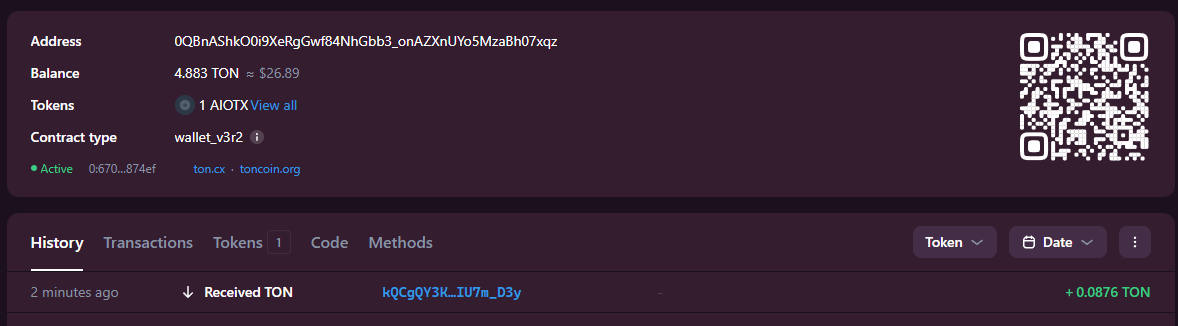 We should see an incoming transfer there