> ## Documentation Index
> Fetch the complete documentation index at: https://docs.int3face.zone/llms.txt
> Use this file to discover all available pages before exploring further.
# DOGE Demo
* Demos
* DOGE Demo
On this page
This is the demo of the inbound and outbound transfer flow in the Int3face for the DOGE tokens.
**Requirements**
1. Int3face node
2. Int3face observer (configured for the DOGE regtest)
3. [DOGE regtest node](/docs/int3face/build-and-run/doge_deploy)
We have everything deployed and ready in the Int3face testnet. Request Int3face team to get access to the testnet environment.
Current Dogecoin vault address: `mtjLBcip4TAy7kSEsVoYKK5zvz1YY1Zy4F`
## Inbound Transfer[](#inbound-transfer "Direct link to Inbound Transfer")
We will use our own DOGE validators funds.
1. We need an int3 address to send funds to
We can generate new address by `int3faced keys add "$your_key_name"`.  We will use the address `int31nx72wqe9js9n0tvk9c2w4zwgwv6kecp0n4zllt`
2. Lets verify that this address doesn't have DOGE tokens in the Int3face
```
int3faced q bank balances int31nx72wqe9js9n0tvk9c2w4zwgwv6kecp0n4zllt
```
We will use the address `int31nx72wqe9js9n0tvk9c2w4zwgwv6kecp0n4zllt`
2. Lets verify that this address doesn't have DOGE tokens in the Int3face
```
int3faced q bank balances int31nx72wqe9js9n0tvk9c2w4zwgwv6kecp0n4zllt
```
 3. Select an UTXO to spend
```
dogecoin-cli listunspent
```
3. Select an UTXO to spend
```
dogecoin-cli listunspent
```
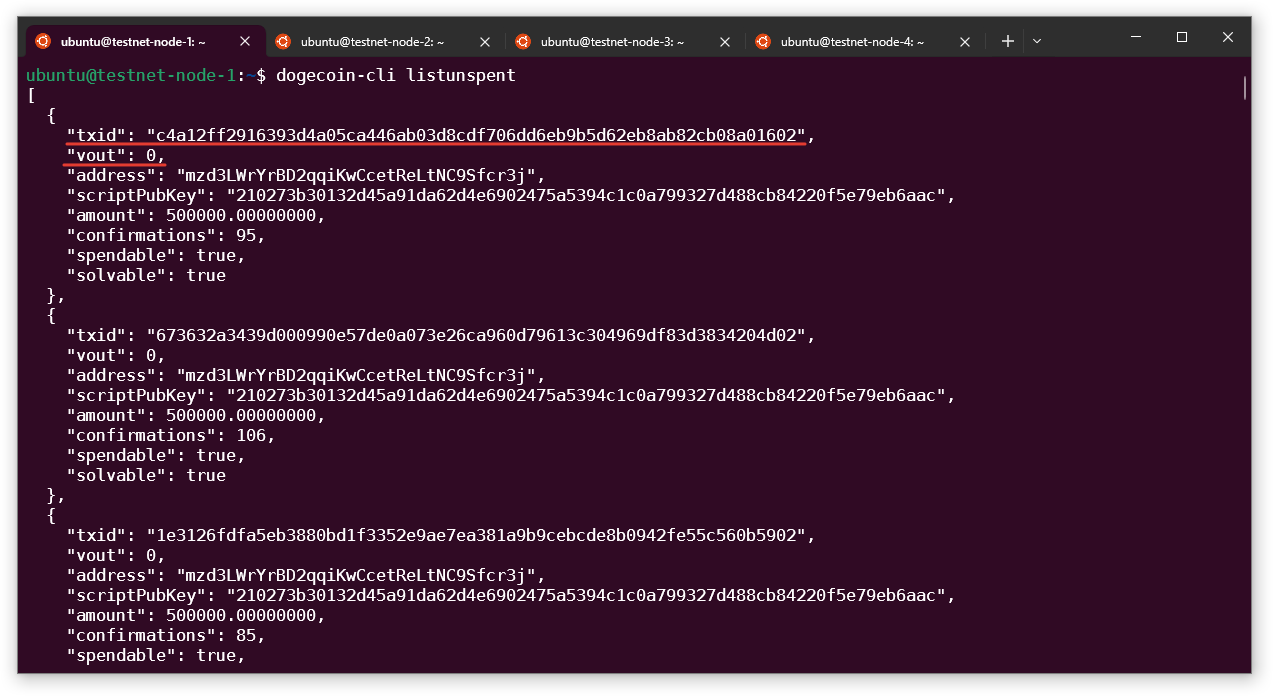 If you don't see any UTXO available, mine a block to receive the rewards `dogecoin-cli generate 1`, and run `listunspent` command again.
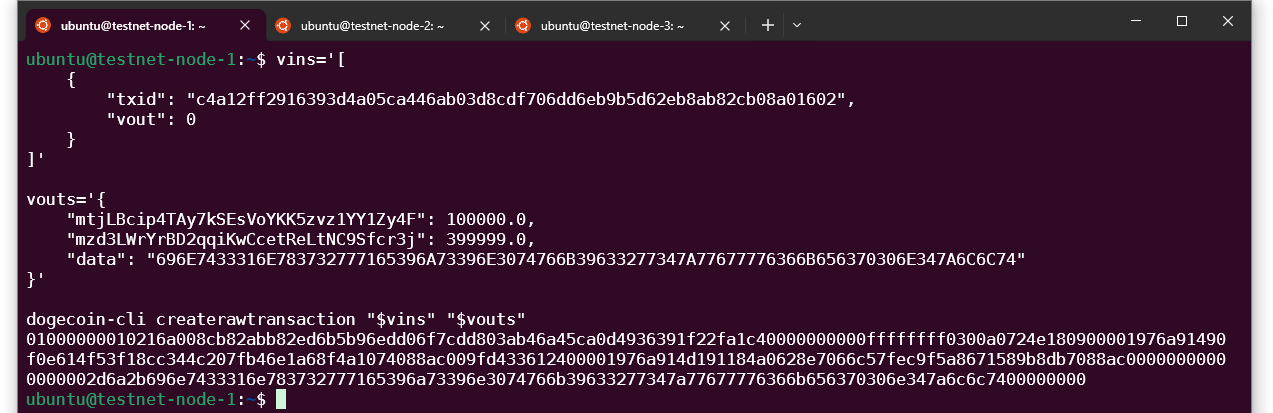
4. Build raw transaction from the UTXO you selected
**Vins**
* Take the `txid` and `vout` from the UTXO you're going to spend
**Vouts**
* Add the DOGE vault address and the amount to send
* Add the change address to get remaining tokens back (to get address of your current node run `dogecoin-cli getaccountaddress ""`)
* Leave a small amount of tokens to pay the fee (1.0 should be enough)
* Add `data` entry with the hex encoded recipient address
* Encode `int31nx72wqe9js9n0tvk9c2w4zwgwv6kecp0n4zllt` at the (online converter)\[[https://www.rapidtables.com/convert/number/ascii-to-hex.html](https://www.rapidtables.com/convert/number/ascii-to-hex.html)]
```sh theme={null}
vins='[
{
"txid": "c4a12ff2916393d4a05ca446ab03d8cdf706dd6eb9b5d62eb8ab82cb08a01602",
"vout": 0
}
]'
vouts='{
"mtjLBcip4TAy7kSEsVoYKK5zvz1YY1Zy4F": 100000.0,
"mzd3LWrYrBD2qqiKwCcetReLtNC9Sfcr3j": 399999.0,
"data": "696E7433316E783732777165396A73396E3074766B39633277347A77677776366B656370306E347A6C6C74"
}'
dogecoin-cli createrawtransaction "$vins" "$vouts"
```
If you don't see any UTXO available, mine a block to receive the rewards `dogecoin-cli generate 1`, and run `listunspent` command again.
4. Build raw transaction from the UTXO you selected
**Vins**
* Take the `txid` and `vout` from the UTXO you're going to spend
**Vouts**
* Add the DOGE vault address and the amount to send
* Add the change address to get remaining tokens back (to get address of your current node run `dogecoin-cli getaccountaddress ""`)
* Leave a small amount of tokens to pay the fee (1.0 should be enough)
* Add `data` entry with the hex encoded recipient address
* Encode `int31nx72wqe9js9n0tvk9c2w4zwgwv6kecp0n4zllt` at the (online converter)\[[https://www.rapidtables.com/convert/number/ascii-to-hex.html](https://www.rapidtables.com/convert/number/ascii-to-hex.html)]
```sh theme={null}
vins='[
{
"txid": "c4a12ff2916393d4a05ca446ab03d8cdf706dd6eb9b5d62eb8ab82cb08a01602",
"vout": 0
}
]'
vouts='{
"mtjLBcip4TAy7kSEsVoYKK5zvz1YY1Zy4F": 100000.0,
"mzd3LWrYrBD2qqiKwCcetReLtNC9Sfcr3j": 399999.0,
"data": "696E7433316E783732777165396A73396E3074766B39633277347A77677776366B656370306E347A6C6C74"
}'
dogecoin-cli createrawtransaction "$vins" "$vouts"
```
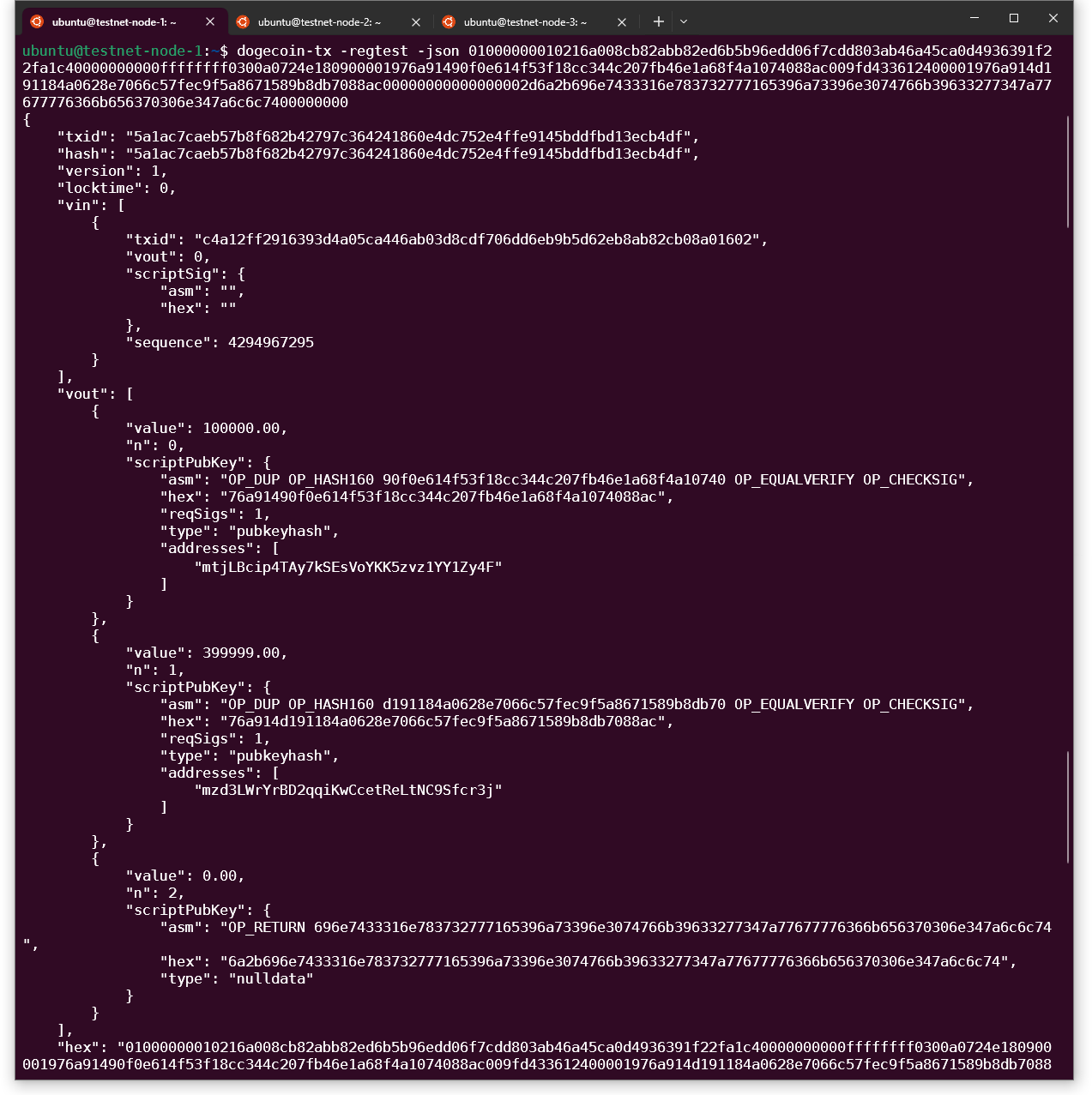
 5. We can verify that the transaction is correct
```
dogecoin-tx -regtest -json "$raw_tx"
```
5. We can verify that the transaction is correct
```
dogecoin-tx -regtest -json "$raw_tx"
```
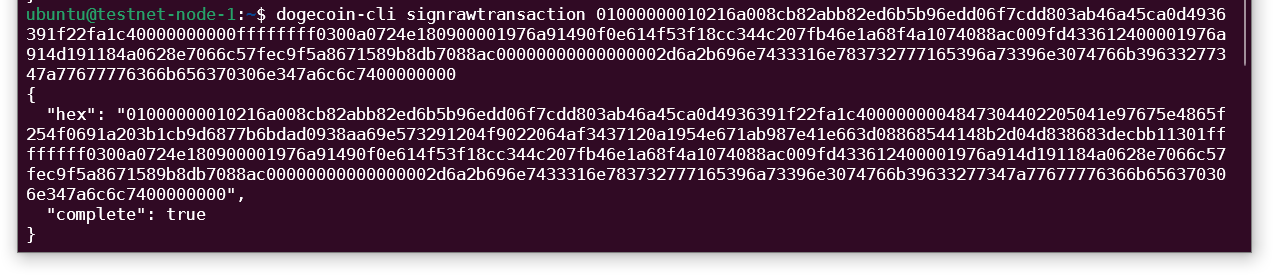
 6. Sign the transaction
```
dogecoin-cli signrawtransaction $raw_tx
```
6. Sign the transaction
```
dogecoin-cli signrawtransaction $raw_tx
```
 7. Broadcast signed transaction to the DOGE
```
dogecoin-cli sendrawtransaction $signed_tx
```
7. Broadcast signed transaction to the DOGE
```
dogecoin-cli sendrawtransaction $signed_tx
```
 8. Generate a block to include our transaction in the chain
```
dogecoin-cli generate 1
```
Now the transaction should be observed by the Observer and sent to the Int3face chain.
9. Check your balance on the Int3face chain.
```
int3faced q bank balances int31nx72wqe9js9n0tvk9c2w4zwgwv6kecp0n4zllt
```
8. Generate a block to include our transaction in the chain
```
dogecoin-cli generate 1
```
Now the transaction should be observed by the Observer and sent to the Int3face chain.
9. Check your balance on the Int3face chain.
```
int3faced q bank balances int31nx72wqe9js9n0tvk9c2w4zwgwv6kecp0n4zllt
```
 Now, we can see DOGE tokens in our wallet.
## Outbound Transfer[](#outbound-transfer "Direct link to Outbound Transfer")
Lets send some of our tokens back from Int3face to DOGE.
1. Generate a new DOGE address
```sh theme={null}
dogecoin-cli getnewaddress
msJf78psekNDSaQwCA2qhYypJqVPWaCCAg
```
2. Request an outbound transfer from the bridge module
```
int3faced tx bridge outbound-transfer msJf78psekNDSaQwCA2qhYypJqVPWaCCAg dogecoin-doge 5000000000000 --from doge_test
```
Now, we can see DOGE tokens in our wallet.
## Outbound Transfer[](#outbound-transfer "Direct link to Outbound Transfer")
Lets send some of our tokens back from Int3face to DOGE.
1. Generate a new DOGE address
```sh theme={null}
dogecoin-cli getnewaddress
msJf78psekNDSaQwCA2qhYypJqVPWaCCAg
```
2. Request an outbound transfer from the bridge module
```
int3faced tx bridge outbound-transfer msJf78psekNDSaQwCA2qhYypJqVPWaCCAg dogecoin-doge 5000000000000 --from doge_test
```
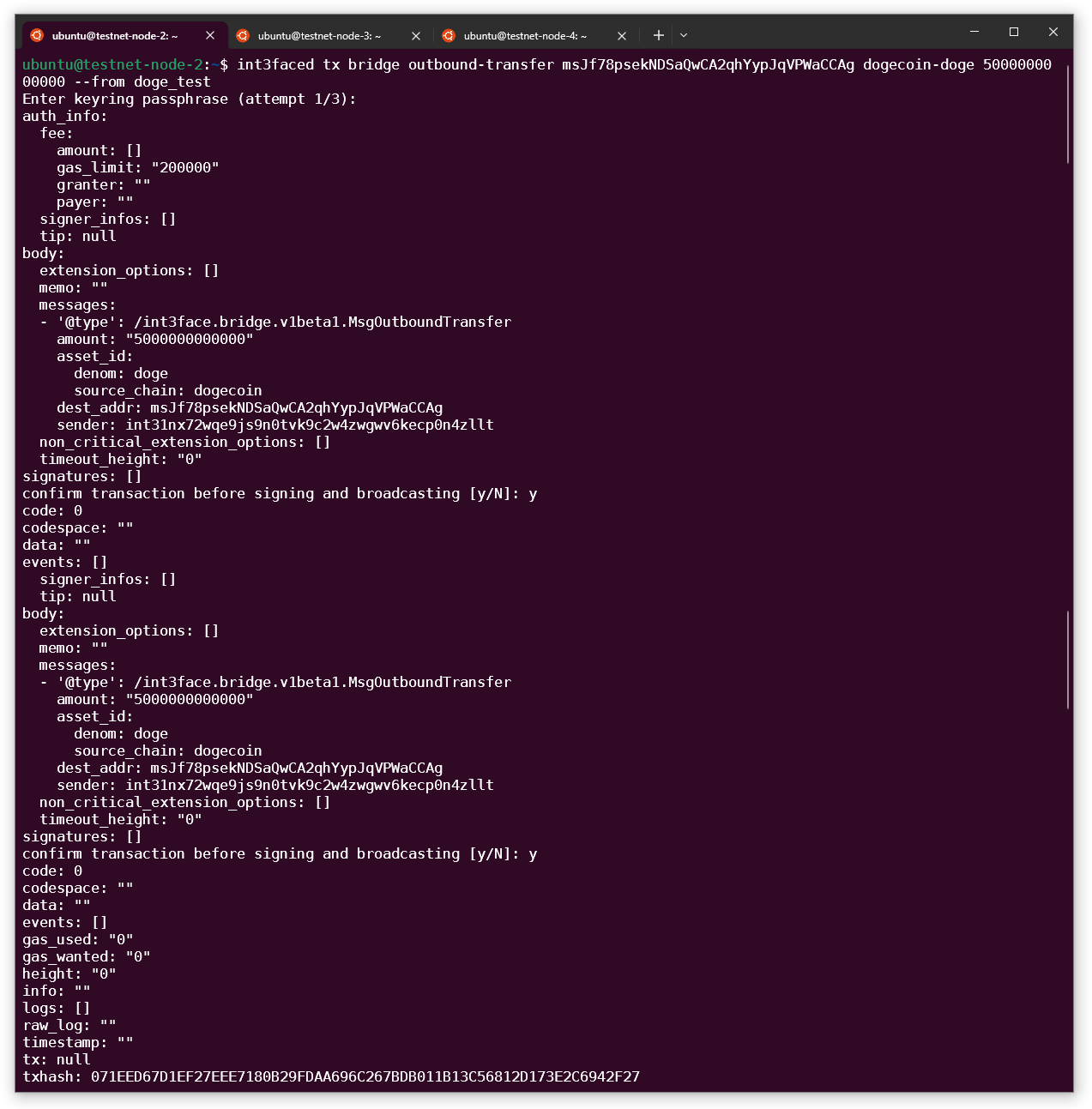 3. We can check our balance again to see that DOGE tokens in Int3face were burt
```
int3faced q bank balances int31nx72wqe9js9n0tvk9c2w4zwgwv6kecp0n4zllt
```
3. We can check our balance again to see that DOGE tokens in Int3face were burt
```
int3faced q bank balances int31nx72wqe9js9n0tvk9c2w4zwgwv6kecp0n4zllt
```
 4. Generate a block in DOGE to include transaction from the vault
```
dogecoin-cli generate 1
```
5. Check DOGE balance of the address we created before
```
dogecoin-cli listunspent 1 9999999 '["msJf78psekNDSaQwCA2qhYypJqVPWaCCAg"]'
```
4. Generate a block in DOGE to include transaction from the vault
```
dogecoin-cli generate 1
```
5. Check DOGE balance of the address we created before
```
dogecoin-cli listunspent 1 9999999 '["msJf78psekNDSaQwCA2qhYypJqVPWaCCAg"]'
```
 Now, we can see DOGE tokens in our wallet.